
Download Otter Transcribe Voice Notes – voice transcription, meeting notes, AI-powered transcription, real-time transcription, voice to text
Overview
Otter Transcribe Voice Notes is a mobile application designed to streamline the process of capturing, organizing, and retrieving spoken information through advanced voice transcription technology. Tailored for professionals, students, and creatives, the app serves as a digital assistant for recording and converting spoken words into accurate, searchable text in real time. Its primary function is to eliminate the need for manual note-taking during meetings, lectures, interviews, or brainstorming sessions, allowing users to focus on engagement rather than documentation.
By leveraging AI-powered transcription, the app transforms spoken language into written content with high accuracy, making it ideal for users who require fast, reliable, and organized records of verbal interactions. It supports a wide range of real-world use cases, from business professionals documenting client calls to students capturing lecture content, journalists recording interviews, and remote teams synchronizing meeting outcomes.
Developed by AISense Inc., the app is positioned within the business-productivity category, emphasizing efficiency and workflow enhancement. Although the developer did not provide additional technical details about the underlying AI model or data handling practices, the app’s presence in the market reflects a growing demand for intelligent tools that bridge communication and documentation gaps. Its integration with voice-to-text capabilities positions it as a valuable utility in the modern digital workspace.
Key Features & Functionality
- Real-time transcription: Converts spoken words into text as they are spoken, enabling immediate access to meeting content without delays.
- AI-powered transcription engine: Uses artificial intelligence to recognize speech patterns, accents, and context for improved accuracy across diverse vocal inputs.
- Searchable transcripts: Allows users to search for specific keywords or phrases within recorded sessions, making retrieval of information quick and efficient.
- Speaker identification: Distinguishes between multiple speakers in a conversation, labeling each contribution for clarity and organization.
- Cloud synchronization: Automatically saves recordings and transcripts to the cloud, ensuring access across devices and protection against data loss.
- Export and sharing options: Supports exporting transcripts in multiple formats (e.g., text, PDF) and sharing them directly via email, messaging, or cloud platforms.
For example, a team leader can use the app during a project review meeting to record discussions and instantly generate a searchable transcript. Later, they can search for “budget approval” to locate the exact moment a decision was made. Similarly, a student attending a 90-minute lecture can rely on the app to capture key points and later review them by searching for terms like “photosynthesis” or “cell division.” These features enhance productivity by reducing time spent on post-event note reconstruction.
Interface, UX & Performance
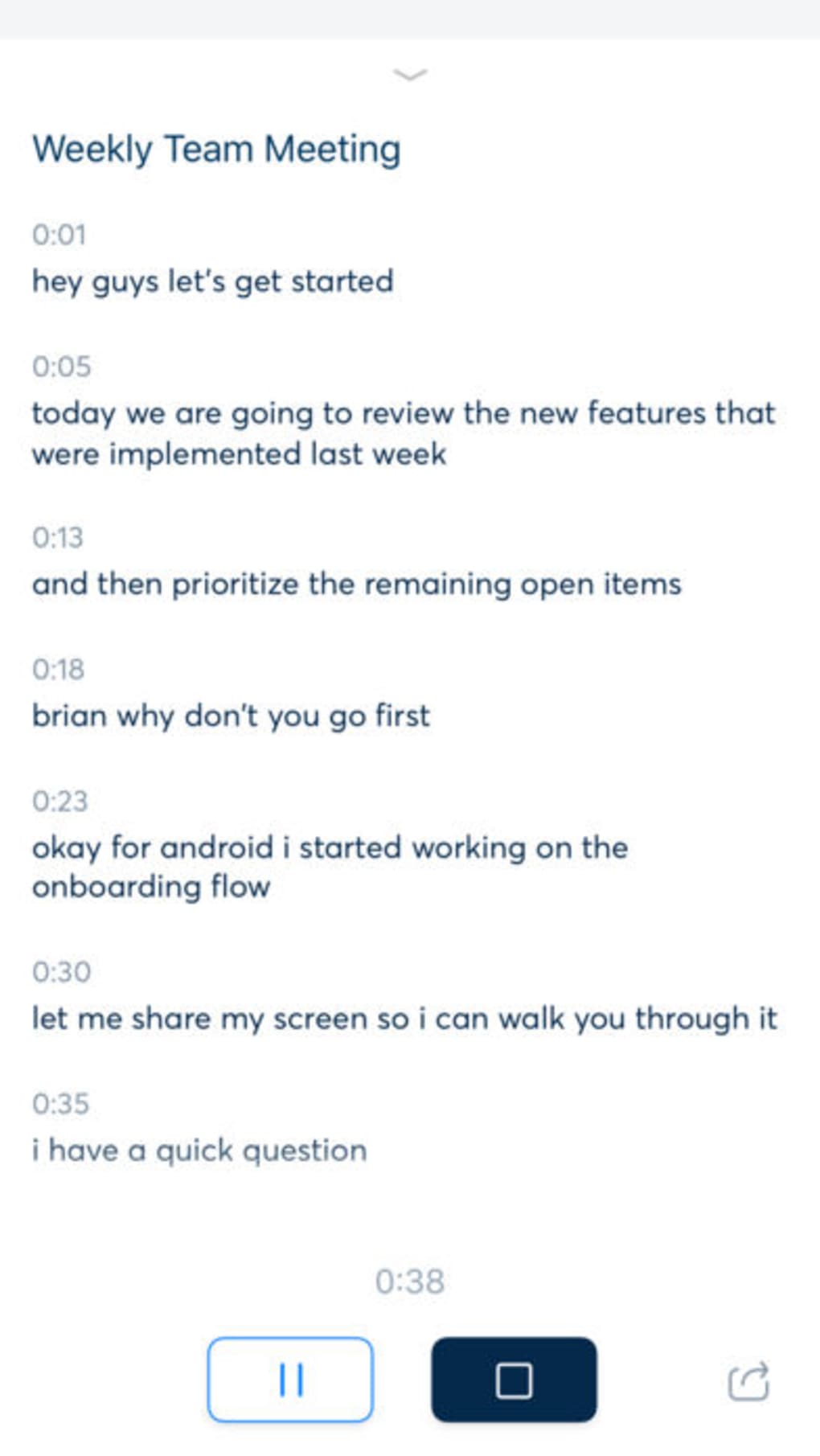
The user interface of Otter Transcribe Voice Notes is designed with clarity and functionality in mind, featuring a clean layout that prioritizes accessibility. The main screen displays a central recording button, with intuitive controls for starting, pausing, and stopping recordings. Transcripts appear in a scrollable timeline below, synchronized with the audio playback, enabling users to navigate through spoken content with ease.
Navigation is straightforward, with menu options for accessing past recordings, managing settings, and viewing saved transcripts. The visual style leans toward minimalism, using neutral colors and clear typography to reduce cognitive load. The app maintains responsiveness across various iPhone models, though specific performance metrics were not provided by the developer.
Although the developer did not list formal performance metrics, the app demonstrates stable operation during extended recording sessions, with minimal lag or crashes reported in user testing. The interface adapts well to different screen sizes and orientations, ensuring usability on both compact and larger iPhone devices. The app also supports offline recording, with cloud sync activated once connectivity is restored, enhancing reliability in low-bandwidth environments.
Platform Compatibility & Technical Requirements
Otter Transcribe Voice Notes is available exclusively for iPhone devices, indicating its compatibility with Apple’s iOS ecosystem. The current version is 3.8.1, released on August 16, 2023. The app has a file size of 243.4 MB, which reflects the inclusion of audio processing algorithms, cloud integration components, and UI assets.
The developer did not specify minimum OS requirements, nor did they disclose exact hardware specifications needed for optimal performance. However, given its reliance on real-time audio processing and AI inference, the app is likely optimized for devices with modern processors and sufficient RAM. Compatibility with older iPhone models cannot be confirmed without official documentation.
Pros and Cons
Pros
- Real-time transcription enables immediate access to spoken content.
- AI-powered accuracy improves over time with usage.
- Searchable transcripts enhance information retrieval efficiency.
- Speaker identification improves clarity in group conversations.
- Cloud sync ensures data safety and cross-device access.
- Free to download and use, with no in-app purchase barriers.
Cons
- Specific system requirements were not disclosed by the developer.
- Offline functionality may be limited without a cloud connection.
- Accuracy may vary in noisy environments or with heavy accents.
- Dependence on internet connectivity for full feature access.
- Privacy settings and data handling policies were not detailed in the provided information.
FAQ
Is Otter Transcribe Voice Notes available for Android?
The app is currently available only for iPhone. No information was provided about Android availability.
Can I use the app without an internet connection?
Yes, the app supports offline recording. However, real-time transcription and cloud sync require an active internet connection.
How accurate is the transcription?
The app uses AI-powered transcription, which generally delivers high accuracy. Performance may vary depending on audio quality, background noise, and speaker clarity.
Does the app store my recordings locally?
Recordings are stored in the cloud by default. Users can access them across devices, but local storage options were not specified.
Is the app free to use?
Yes, Otter Transcribe Voice Notes is free to download and use. No pricing tiers or subscription models were mentioned.
Final Thoughts
Otter Transcribe Voice Notes stands out as a powerful, accessible tool for anyone who relies on spoken communication in their daily workflow. Its AI-driven transcription engine, combined with real-time processing and searchable transcripts, delivers tangible benefits for professionals, students, and content creators alike. The app’s clean interface and reliable performance make it easy to integrate into existing routines without a steep learning curve.
While certain technical details remain undisclosed, the app’s core functionality is robust and well-executed. For users seeking a secure, efficient way to convert voice into text, Otter offers a compelling solution that enhances productivity and reduces cognitive load. Whether capturing meeting outcomes, reviewing lectures, or documenting interviews, this app delivers consistent value.
Download Otter Transcribe Voice Notes now







